Every Space gets a name, a color, and an identity
macOS Spaces are powerful but anonymous: just numbered desktops. Scopo gives each one a project card with a name, color, and icon so you can tell them apart instantly.
How it works
Each Space auto-generates a project
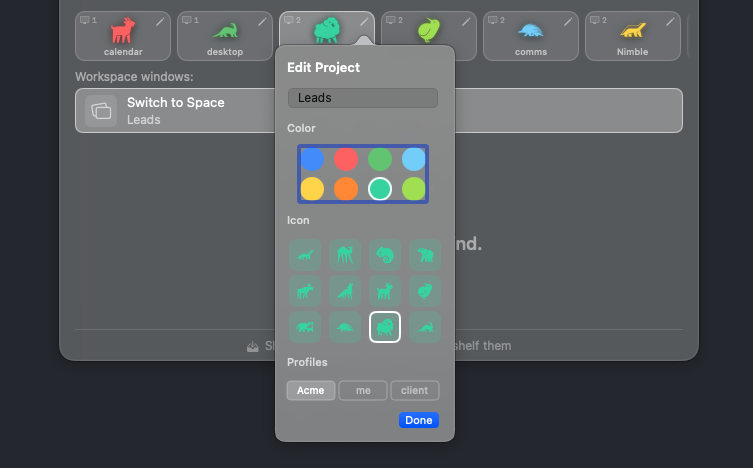
When Scopo detects a new macOS Space, it creates a project with a random color and animal name, like “Teal Wolf” or “Blue Armadillo.” No setup needed.
Customize it
Click the pencil icon on any project card in the switcher overlay to change its name, color, and animal icon. Make it yours. Custom names, colors, and icons are a Pro upgrade; on Free, every Space still gets an auto-generated identity.
Cycle through projects inline
While the switcher is open, press Left or Right arrow keys to cycle through projects. The window list updates to show windows from the selected project.
Click to switch Spaces
Click a project card in the horizontal bar to jump to that Space immediately. Scopo handles the cross-space transition for you.
Tips & tricks
Auto-generated names
Scopo picks from 8 colors and 16 animals (128 combinations) and avoids duplicates. You’ll always know which project is which.
Project bar
The horizontal project bar at the top of the switcher shows all your projects as color-coded cards. The active project is highlighted.
Persistent identity
Project names and colors survive restarts. Your customizations are saved to disk and restored when Scopo launches.
Ready to try Projects?
Scopo's window switcher is free forever. Start an optional 30-day Pro trial to try every feature.
macOS 14+ required