
Send any window to the right Space with one shortcut
A window ended up in the wrong Space? Instead of dragging it through Mission Control, press one shortcut. Scopo figures out where it belongs and moves it there.
Pro feature — see what's included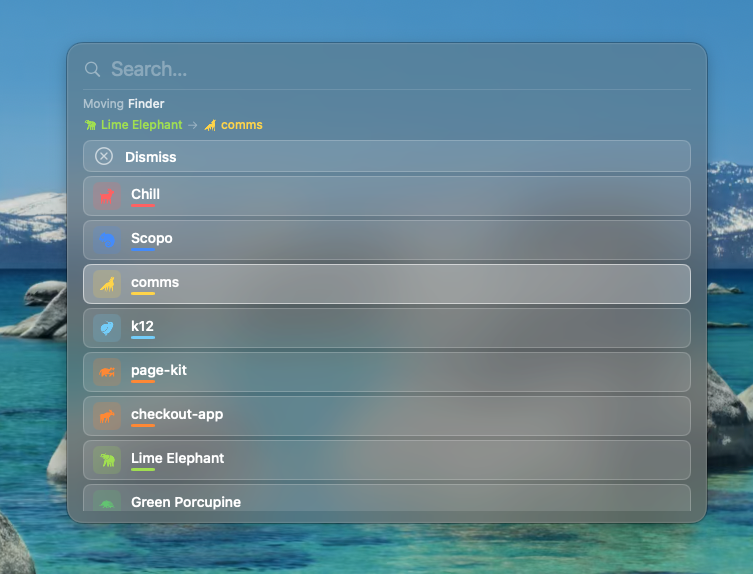
How it works
Press Shift+Cmd+M
With any window in focus, press the Move Window shortcut. Scopo reads the window’s title and analyzes where it belongs.
Quick press for auto-match
Tap and release quickly. If Scopo is confident about the best destination (based on text fingerprinting), it moves the window there immediately. No overlay needed.
Hold for a ranked list
Keep the modifier keys held and Scopo shows a ranked list of destination projects. The best match is pre-selected. Release to confirm, or tap to pick a different one.
Window lands in the right Space
Scopo handles the cross-space move for you. The window disappears from your current Space and appears in the destination.
Tips & tricks
Smart matching
Scopo tokenizes window titles and scores each Space using TF-IDF. A terminal running “blue-fox-api” will match a Space whose windows are all about “Blue Fox.”
Custom shortcut
Prefer Option+Shift+M? Or something else? Change the Move Window shortcut in Settings → General.
Confidence threshold
Scopo only auto-moves when the top match scores well above the second-best. If it’s unsure, it always shows the ranked list so you can decide.
Ready to try Move Window?
Scopo's window switcher is free forever. Start an optional 30-day Pro trial to try every feature.
macOS 14+ required